
Umo Transit Fare Management System
.png "Umo")
Launching October 5, 2026: Umo, Transit Fare Management System
Get Ready for Umo: A New Way to Pay
A more convenient way to ride is on the way. Umo (pronounced “you-mo”) is a digital fare management system designed to make paying for transit faster, smarter, and more flexible for riders.
With Umo, you'll enjoy greater convenience and flexibility every time you ride. Follow Transit Windsor on social media for the latest updates, helpful tips, and important information leading up to launch day on Monday, October 5, 2026. You'll also see Transit Windsor staff out in the community, providing demonstrations, answering questions, and helping riders get ready for the transition to Umo.
What is Umo?
Umo is an all-in-one digital fare management system that will replace current smart card passes, making it easier to pay, ride, and manage your transit account, all from your phone or reloadable Umo card.
When Can I Start Using Umo?
You can get started today by downloading the Umo Mobility app and setting up your account before the launch date. However, you will not be able to load fare or funds onto your account, or scan and ride until October 5, 2026.
Current Smart Card User? Your existing Transit Windsor Smart Card remains valid until December 31, 2026.
Payment Options
Umo allows you to select the payment option that works best for you, including the following:
Note: Press Enter or Space to expand or collapse sections. Use Expand All or Collapse All buttons to control all sections.
- Buy, manage, and scan your fare right from your phone.
- Umo works without mobile data once logged in.
- Scan your QR code on the Umo digital validator.
- Umo cards are reloadable and are designed for repeat use.
- You can reload them in person or online.
- Tap your card on the Umo digital validator. No need to swipe your card.
- Initial card fee is $6.00. Replacement card fee is $10.00.
- Coins and bills will still be accepted.
- Remember to ask the bus operator for a transfer.
- Exact fare only. The firebox and bus operator cannot make change.
- As an alternative, we recommend using the "Umo wallet."
Discounted Fare Programs
Senior, Youth, and Affordable Pass Program fares are available for eligible riders. Visit the Windsor International Transit Terminal (300 Chatham Street West) to have the discount applied to your account. Once applied, your discounted fare remains on your account, whether using your phone or your card for future purchases. Subject to ongoing program eligibility requirements.
Getting Started with the Umo Mobility App
- Search for the Umo Mobility app in your app store and download (Apple App Store or Google Play).
- Read and agree with the Terms of Use and Privacy Policy, then select Get Started.
- Enable Location permissions:
- Select Allow Once — this allows the Umo app to determine your initial location.
- Select Allow While Using App — this will allow the Umo app to always recognize your location while using the app.
- Select Don’t Allow — this step blocks the Umo app from determining your location.
- Select Enable notifications to get live updates and allow notifications for real-time transit alerts, service updates, and more.
- Select the Canadian flag and search for Transit Windsor.
- Sign in to set up your account. While accounts can be set up in advance, riders will be able to load funds, purchase passes, and start using Umo beginning on October 5, 2026.
- Tap Wallet on the main screen of the Umo app.
- Select Buy and then choose to Add Money or Add Pass.
- Select the Stored Value or Pass you would like to purchase.
- Select Add Payment Method on the Review Purchase screen.
- Enter your card details on the Add Card screen and Save Card.
- Review Purchase then tap Purchase to buy your fare or pass.
Using the App to Pay and Travel
- Open the Umo app before boarding the bus and select Show Code to display your dynamic QR code.
- Turn up the screen brightness.
- Board the bus and scan your QR code at the Umo digital validator; you may have to slowly pull the phone away from the scanner until it is read.
- Look and listen for the validator’s confirmation signals. A checkmark and single beep indicate your fare has been accepted.
Purchasing a Reloadable Umo Card
Visit the Windsor International Transit Terminal, located at 300 Chatham Street West, to purchase your reloadable Umo Card. All new Umo cards are $6.00, and replacement cards are $10.00.
- Visit ca.umopass.com to access the Umo Passenger Portal.
- On the Sign In page, click Create Account.
- On the Let’s Get Going page, select Register a Card.
- Enter your 16-digit card number and click Next.
- Use your email address as your username, and create a password. (Using your email address helps with account recovery.)
- Read and accept the Terms and Conditions, and click Save .
Using the Card to Pay and Travel
- Have your card ready before stepping on to the bus.
- Board the bus and hold the card in front of the Umo digital validator.
- Look and listen for the validator’s confirmation signals. A checkmark and single beep indicate your fare has been accepted.
Understanding the Validator Display
A checkmark with a green background means your fare has been accepted. You’re good to go.
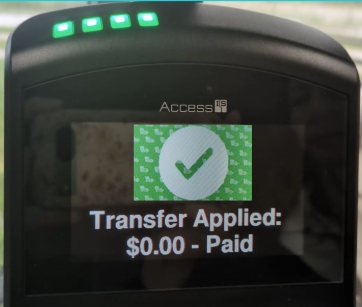
A checkmark with a yellow background means your fare has been accepted, but your balance is low, or fare product is expiring soon.
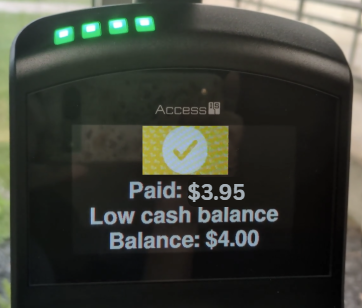
An X with a red background means your fare was not accepted. This may happen if there is no valid fare product or insufficient Umo cash balance.
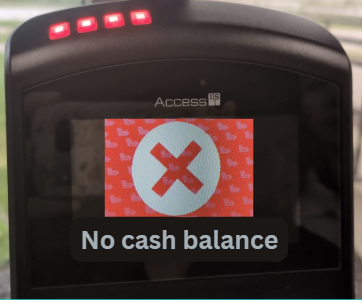
Important Information
- For discounted fare programs, please visit the Windsor International Transit Terminal (WITT), 300 Chatham Street West.
- Families can link accounts for dependents. Details on account linking can be found in the frequently asked questions (FAQ) below.
Helpful Resources
- Umo Frequently Asked Questions (FAQ)
- Create and Register an Account
- How to Redeem a Benefit Code
- Umo Pass Terms and Privacy Policy
Customer Service
Transit Windsor Customer Service representatives are available to help with all Umo-related questions:
- Phone: 519-944-4111 (available seven days a week, 8:00 a.m. to 6:00 p.m., excluding holidays.)
- In person: Windsor International Transit Terminal (WITT), located at 300 Chatham Street West.
For general inquiries, contact 311, or report an issue online.
For additional account support, please visit the Umo website.
Follow us on our social media channels:



.png "Linkedin")